Chicken Shooting 2D Arcade
Reviews
Description
Game Introduction
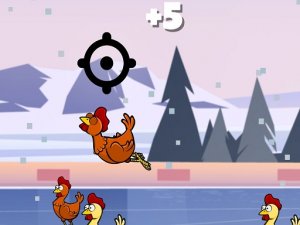
Chicken Shooting 2D is a lighthearted arcade game that puts your aiming skills to the test. Colorful 2D chickens fly across the screen in various patterns, and your goal is to shoot as many as possible. Each hit adds points to your score. The game is designed for players of all ages who enjoy simple, non-violent shooting challenges. It offers a relaxing yet engaging experience that helps improve focus and precision.
How to Play
Use the arrow keys on your keyboard to move the crosshair around the screen. Aim at the flying chickens and press the spacebar or left mouse button to shoot. Each chicken you hit earns points. Keep track of your bullet count, shown on screen. When you run out of bullets, press the R key to reload and continue. The game is easy to learn, making it accessible for everyone.
Game Features
Fun 2D graphics with bright colors. Simple arrow key controls for easy movement. Reload mechanic that adds a strategic layer. Score tracking to challenge yourself. Addictive gameplay that encourages repeated play.
Tips for Success
To improve your score, practice tracking the chickens' flight patterns. Manage your ammunition carefully by reloading only when necessary. Stay calm and focus on accuracy rather than speed. Regular practice will help sharpen your reflexes and precision.
Compatibility
Faq
Handpicked Games
Kitten Rescue Arcade
Charming rescue game with simple controls. Great for quick, feel-good play sessions.

Super Bounce Arcade Jumper
Simple tap controls and increasing speed make this a fun reflex challenge. Great for short breaks.
Holiday Jigsaw Puzzle Game
Beautiful holiday image with smooth controls. A peaceful puzzle that feels rewarding to complete.

Ragdoll Physics Puzzle Game
Simple controls and funny physics. Great for quick stress relief and creative play.

Color Blocks 2 Puzzle Game
Clean design and smooth gameplay. Great for short breaks. Puzzles are satisfying to solve.
Puppy Blaster 3D Puzzle
Bright visuals and easy controls make this a perfect casual puzzle game for all ages. Great for relaxing.